
Is There an MCP Server for Video Editing?
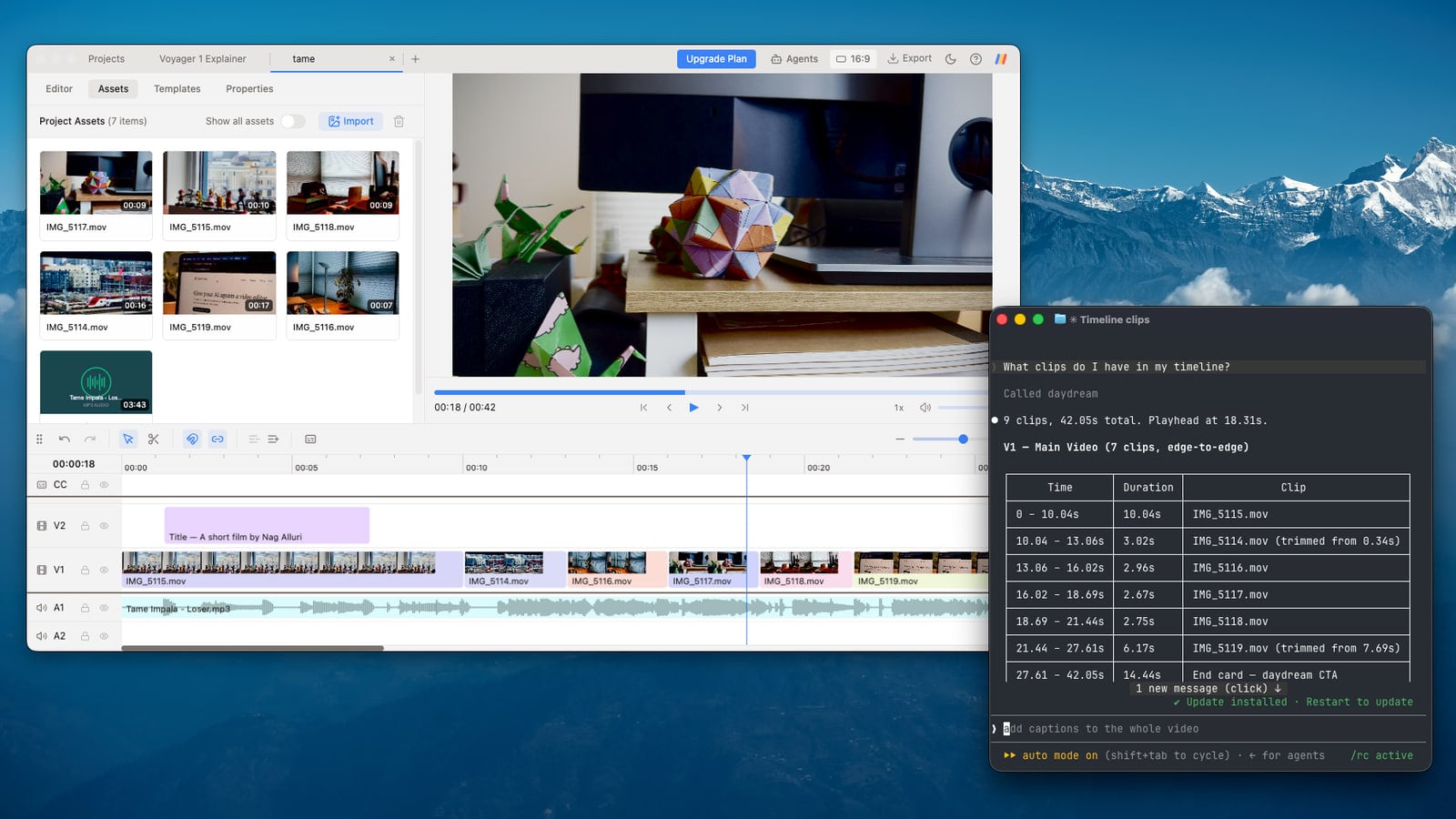
Yes! Daydream is a desktop video editor with a local MCP (Model Context Protocol) server that lets AI agents like Claude and ChatGPT edit videos directly on its timeline: cutting footage, adding captions, building motion graphics, and more.
What is MCP?
If you're unfamiliar with MCP, it stands for Model Context Protocol, and it's basically a way to connect apps to your AI agents. It allows your AI to actually perform actions directly within apps instead of just giving you the steps.
With Daydream, that means your AI can do things like edit your videos, create motion graphics, or add custom captions for you.
What the Daydream MCP server can do
The server exposes the whole editor as tools, so an agent can run an edit from import to export. Through MCP, your agent can:
- Import footage, create projects, and switch a project between 16:9 and 9:16.
- Transcribe video and cut by transcript: remove silences, bad takes, and filler words.
- Search your footage by describing a scene, then place matching b-roll on the timeline.
- Add captions, apply a caption style preset, or style them word by word.
- Build motion graphics (lower thirds, callouts, title cards) and place them on the timeline.
- Set keyframes for zooms, pans, and animations, with easing.
- Read the timeline state and the playhead position, so "add a sound effect here" means exactly where you are.
- Export a finished MP4, or an XML timeline for Final Cut Pro, DaVinci Resolve, Premiere Pro, or CapCut.
Where MCP gets really powerful: your existing workflows
The real power of MCP happens when you connect it into your existing workflows. For example, you can write a video brief in Google Drive, then have Claude or ChatGPT read that brief and use it as editing instructions to edit your video in Daydream. Your AI reads from one app and edits in another, with no copy-pasting in between.
Edit multiple videos at once
One of the best parts about Daydream is that it supports multiple tabs, meaning your AI can edit multiple videos at the same time. This is a first for video editing and something that really separates Daydream from other editors out there.
Here's what that looks like in practice. Say you recorded five talking-head clips for the week. Hand the folder to your agent and ask it to cut the silences, add captions, and export each one as a vertical short. It opens a project per clip, works through them, and you review each timeline as it finishes, tweaking anything you'd do differently. What used to be an afternoon of repetitive editing becomes a single request.
How to connect your AI (under 5 minutes)
- 01Download Daydream and create a new project.
- 02Open your AI app:
- If you use Claude: open the Claude desktop app and start a Claude Code session (the coding workspace inside the app). Daydream connects to it automatically.
- If you use ChatGPT: open the ChatGPT desktop app and start a Codex session (OpenAI's agent, built into the app). Daydream connects to it automatically.
- If you use another MCP client: those work too.
- 03Keep Daydream open and type "What project do I have open?" into your AI. If it answers with your Daydream project name, congrats, you're all set.
- 04Ask for your first edit: "Remove the silences from this video."
Manual setup (if the automatic connection fails)
Daydream registers its MCP server automatically, but if something goes wrong, you can register it manually by running one of these in your terminal:
Claude:
claude mcp add daydream --transport http http://127.0.0.1:7433/mcp --scope userCodex:
codex mcp add daydream --url http://127.0.0.1:7433/mcpFor more detail, see the connection guide.
FAQ
Which AI agents work with Daydream?
Claude, Claude Code, ChatGPT (via Codex), and any other MCP-compatible client. See the Claude and Codex pages for specifics.
Is it free?
Yes, Daydream is free to use, including the MCP server.
Can the AI export the finished video?
Yes. Agents can drive the full workflow from import to export, and you can step in manually at any point on the timeline.
Try Daydream free
Full editing capabilities and unlimited watermark-free exports on the free plan. No credit card required.