
How to Make Custom Animated Captions for Your Videos with Claude & ChatGPT (+5 Free Templates)
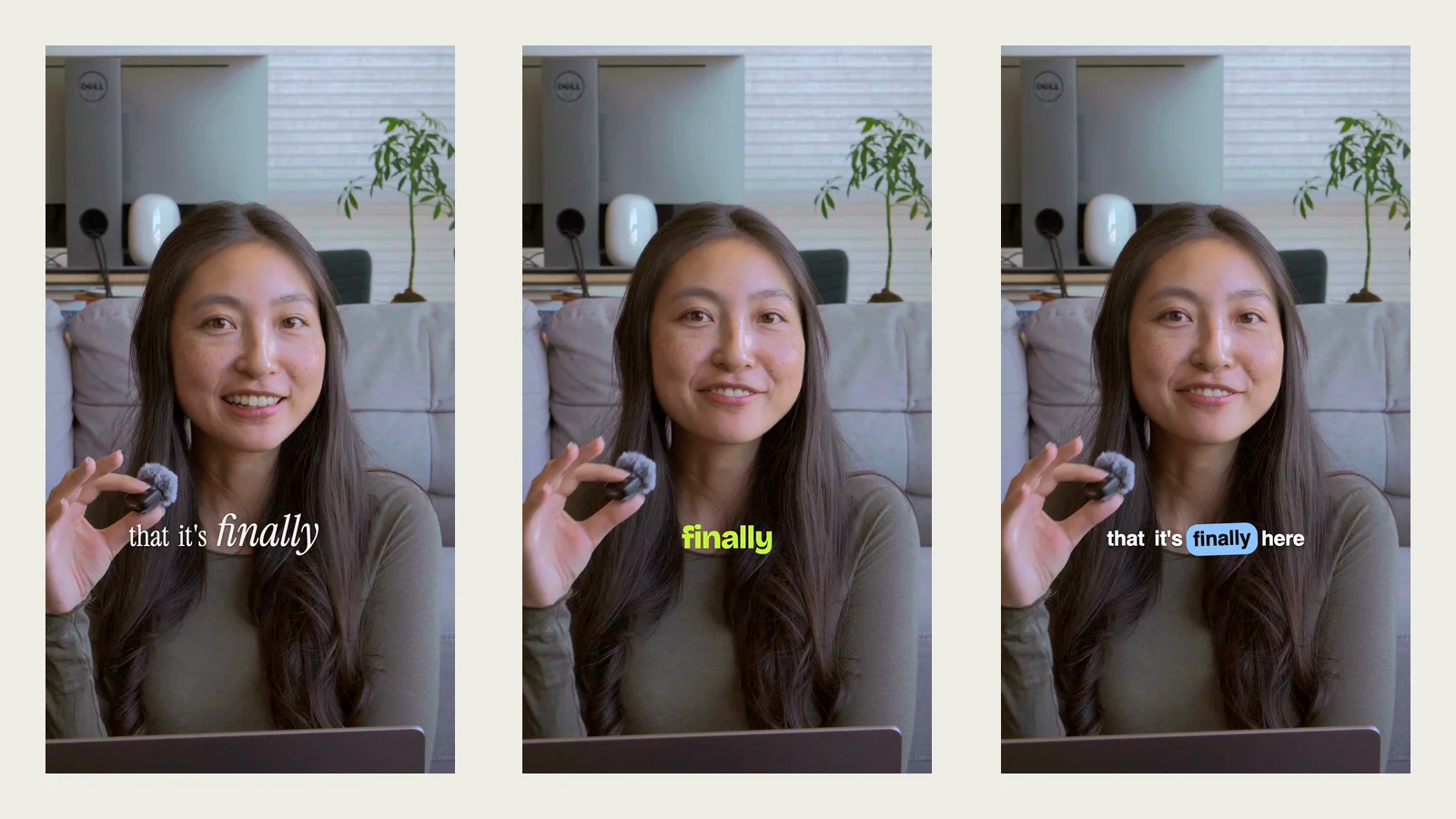
To add custom animated captions to your videos with Claude or ChatGPT, you need three things: a transcript with word-level timestamps from a transcription model like Whisper, a description of the caption style you want, and a way to render those captions onto your video. Claude Code and Codex can put those pieces together on your computer, or you can use Daydream, which gives Claude and ChatGPT transcription and caption tools built in.
The two tricky parts are getting the AI a transcription model so it knows the timing for your captions, and describing to the AI what you want your captions to look like. We'll go through both step-by-step, and there are also 5 free caption templates that you can use or even build off of. Jump to the free caption templates, or skip to Daydream for the fastest route.
How do Claude and ChatGPT add captions to videos?
In order for Claude and ChatGPT to add captions to your videos, they need to know what is actually said in the videos. However, they aren't transcription models and can't transcribe videos on their own. What they need is to download and use a transcription model.
This is also why you'll want Claude Code or Codex rather than the regular Claude or ChatGPT chat apps. The chat apps run in a sandbox where they usually can't install a transcription model or render a full-length video (the same reason chat alone can't edit video). Claude Code and Codex run on your computer, so they can download a model, run it on your video, and render the captioned result.
Whichever model you choose, make sure it returns word-level timestamps: the exact start and end time of every word. That's what keeps captions in sync with your voice, and it's what makes effects like highlighting each word as you say it possible. Models differ in how accurate they are at transcribing what you're saying, how much they cost, and how many languages they support. For example:
| Option | Where it runs | Cost | Good for |
|---|---|---|---|
| Whisper (open source) | On your computer | Free | Privacy and no API key. Supports around 100 languages, but can be slow on older machines. |
| Whisper API (whisper-1) | Cloud | Pay per minute of audio | The same Whisper model without running it yourself. Fast, and easy for the AI to set up with an API key. |
| Deepgram | Cloud | Pay per minute of audio | Fast transcription with custom vocabulary for names and jargon. |
Newer models like GPT-Transcribe can be more accurate, but they don't return word-level timestamps, so you'd need a separate alignment step to get word timings for captions.
How to add custom captions with Claude Code or Codex, step by step
- 01Install Claude Code or Codex and open it in the folder with your video.
- 02Ask it to transcribe your video with word-level timestamps, for example: "Transcribe video.mp4 with Whisper and save word-level timestamps to a JSON file." Skim the transcript and fix any misspelled names or jargon.
- 03Describe your caption style (see what to describe below), or use one of the free templates.
- 04Ask it to render a 10-second test clip with the captions burned in before doing the whole video.
- 05Give feedback on the test clip, then render the full video.
How to describe your caption style to Claude or ChatGPT
Claude and ChatGPT will design and overlay the captions on your videos, but you'll get better results by describing to the AI what you want your captions to look like. There are several things you can consider when designing your captions:
- How do you want to chunk the words into captions? (e.g. one-word captions vs. showing an entire phrase on screen at a time)
- Do you want any karaoke effects? (e.g. do you want words highlighted as you say them, like TikTok captions?)
- Do you want any animations? (e.g. how should the words appear on and leave the screen? Should they just appear, or fade in?)
- Any special text styling? Do you have brand guidelines you're trying to match? (text color, background color, fonts, positioning, etc.)
Once you think through those details, you can include them in your prompt and have Claude or ChatGPT build it and add it into your video. One thing to keep in mind is that it'll need to re-render your video every time you adjust your caption style, which can be slow and create a lot of in-progress files. It can help to batch your edits and requests to avoid too many iterations.
How to add custom animated captions with Daydream
Daydream is a video editor that connects with Claude and ChatGPT and provides them a full editing toolset, including transcription and caption designing and editing, so you can create custom animated captions right away. You can ask it to transcribe your video and create several different caption styles that suit your brand guidelines. You can preview the options in real time against your video and adjust or provide feedback until it looks the way you want it to before exporting.
- 01Download Daydream and connect Claude or ChatGPT.
- 02Import your video.
- 03Ask the AI to transcribe it and add captions, describing the style you want, or apply one of the free templates below.
- 04Preview the captions on your video and ask for changes until they look right.
- 05Export, or save the style as a preset to reuse on future videos.
If you like what it makes, you can save that caption style so you can reuse it in future videos without having to describe it again. And if your video includes brand names or jargon that are often mistranscribed, you can ask Daydream to remember them, so next time you don't need to fix the misspelled captions.
5 free animated caption skills + templates
Each template is a free .zip with a preview you can open in your browser, a full design spec (fonts, sizes, colors, and animation timing), the HTML/CSS/JS caption template, and a Claude skill that applies it. Use them in Daydream, or give the spec to Claude, ChatGPT, or any editor to recreate the style without describing it yourself.
Editorial captions
Words blur in and feel cinematic, with key words emphasized in larger italics.
Instrument Serif, blur-in, italic key words
Download skill + template (.zip)One-word captions
Each word rises into place individually as it's said, with key words in lime. Great for high-energy videos.
Bricolage Grotesque, rise-in, lime key words
Download skill + template (.zip)Pill captions
Words are chunked into phrases, with each word popping into a colored pill as it's said. This adds a bit more color to match your brand styles.
Bricolage Grotesque, sky-blue pill, pop-in
Download skill + template (.zip)Underlined captions
Words are chunked into phrases, with an underline drawing in under each word as it's said. This adds a bit more color to match your brand styles.
Bricolage Grotesque, coral underline, draw-in
Download skill + template (.zip)Documentary captions
Simple phrase-based chunking, with plain white text on a translucent background.
Figtree, translucent box, no animation
Download skill + template (.zip)Want all five? Download all five skills + templates (.zip).
How to use the free caption templates
In Daydream (the fastest way, since transcription and rendering are built in):
- 01Download and unzip the template.
- 02Open your video in Daydream and ask the AI: "Apply the caption template in ~/Downloads/editorial-captions."
- 03Preview it on your video and ask for any changes, like your brand color or a different font.
- 04Ask the AI to save it as a caption preset so you can reuse it on future videos.
With Claude Code or Codex:
- 01Download and unzip the template.
- 02Ask Claude Code or Codex to install it: "Move the editorial-captions folder from my Downloads into your skills folder."
- 03Ask: "Add editorial captions to video.mp4." The skill includes the full design spec and a working reference, so the AI can recreate the exact style however it renders your video.
FAQ
Can ChatGPT add captions to a video?
Not in the regular ChatGPT chat app, which usually can't run a transcription model or render a full video. Codex, OpenAI's coding agent, can transcribe your video with a model like Whisper and render captions onto it on your computer. Or connect ChatGPT to Daydream, which has transcription and captions built in.
Can Claude add subtitles to a video?
Yes, with Claude Code or Daydream. Claude Code runs on your computer, so it can download a transcription model, transcribe your video with word-level timestamps, and render subtitles onto it. In Daydream, Claude can transcribe, caption, and style your video directly on the timeline, and you preview every change before exporting.
What's the best transcription model for captions?
It depends on how much accuracy, cost, and language support matter to you. Whisper is free, open source, and runs on your computer. Cloud APIs like the Whisper API and Deepgram are faster and charge per minute of audio. Whichever you choose, it needs to return word-level timestamps for captions to stay in sync, which newer models like GPT-Transcribe don't.
How do I make TikTok-style word-by-word captions with AI?
Ask for karaoke-style captions: a short phrase on screen with the word you're saying highlighted. This needs a transcript with word-level timestamps so the highlight moves in sync with your voice. The Pill and Underlined templates in this post are both this style.
Try Daydream free
Full editing capabilities and unlimited watermark-free exports on the free plan. No credit card required.