
How to Make Vox-Style Motion Graphics With AI (+ Free Skill)
To make Vox-style motion graphics with AI, you really just need a specific description of the style, any images or information you want conveyed, and a way to animate them in time with your voiceover. The AI will then create the motion graphics and animate them to your voiceover. Previously people typically achieved Vox-style graphics with AI generated video or manually through After Effects, but now with a description of the style, you can actually create them cheaper and more flexibly through code.
We'll go through what to put in that description, and there's also a free skill and prompt you can use or build off of. Jump to the free skill, or skip to Daydream for the fastest route.
What is the Vox style?
Vox-style graphics are easily identified by the analog aesthetic in Vox's explainer YouTube videos. These are often based on paper collages, with torn paper, cut outs, or newspaper clippings, or can contain animated infographics of maps, charts, or highlighted text. They feel very analog with their heavy use of texturing, layers, and a not perfectly smooth motion that mimics stop motion animation. Typically tutorials involving AI generated video recreated the collage look, and more manual After Effects tutorials focused on the maps and infographics, but you can achieve both with Claude or ChatGPT created motion graphics.
Can Claude or ChatGPT make Vox-style graphics?
Yes, with the right tools. Claude and ChatGPT can write the code for a graphic, but they don't have a timeline or a way to preview it against your video (the same reason chat alone can't edit video). Connect them to Daydream, and they can build the graphics right on your timeline, help you explore different options, time it to your voiceover, and you can even save graphics and reuse them for future videos.
How to describe the Vox look to AI
To achieve the look it's important to get enough details into the prompt. Here are 2 versions of a graphic about the same fact, both built with Claude Opus 5.5 in Daydream. The first prompt only asks for a Vox style:
Weak prompt:
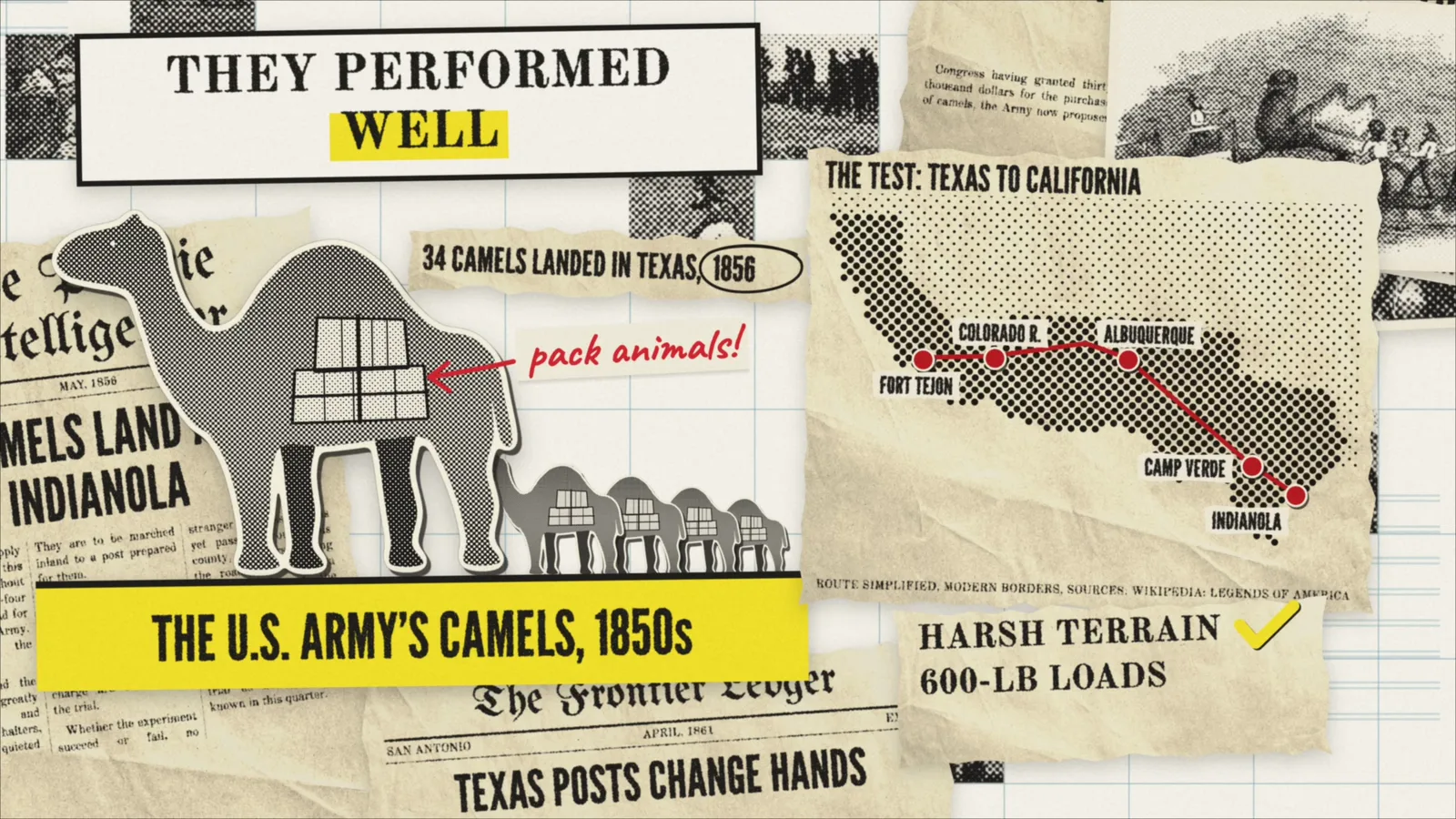
Create 1 Vox-style graphic about this fact: The U.S. once had a camel program. In the 1850s, the Army imported camels to test them as pack animals in the Southwest. They performed well in harsh terrain, but the Civil War disrupted the experiment.It's a nice graphic, but it reads as digital: a flat background, clean shapes, smooth motion, and only a few elements. The second prompt adds style guidelines:
Strong prompt:
Create 1 Vox-style graphic about this fact: The U.S. once had a camel program. In the 1850s, the Army imported camels to test them as pack animals in the Southwest. They performed well in harsh terrain, but the Civil War disrupted the experiment.

Reference these style guidelines: [paste the style prompt below]Use numbers rather than adjectives: hex colors, frame rate, easing, layers and shadows. "Aged paper" leaves a lot up to the AI. "#f6f3e9 background," "tilted 3-13 degrees," and "stepped stop-motion at 12fps" don't. Here's the full style prompt we used, which you can copy and paste. Just replace [TOPIC] with your own:
Vox-style prompt:
Create motion graphics for a historical explainer video about [TOPIC], in a tactile, analog paper-collage style: printed archive material on a desk, shot frame by frame. It should feel physical and slightly imperfect, never digital or clean. Build one shot at a time at 1920x1080, full-frame. Show me each shot before moving on.

## Overall look
- Airy and bright, not dark or moody. Layered, but with breathing room.
- Palette: warm cream background, near-black ink, warm aged paper, and one bright accent. Use a second accent only for handwriting.
  - Background cream: #f6f3e9
  - Ink: #1c1a17
  - Graph-paper lines: rgba(120,165,185,.5)
  - Accent yellow: #f6d81f
  - Handwriting red: #e0322a
  - Map yarn red: #c4261b
- Never use pure white paper. Paper should be a little cream or aged, with creases showing, and slightly darker than the background so sheets stand out.

## Background
- Graph paper with thin, pale blue lines in 160px cells, drifting slowly.
- Optional patches of small dashed grid near the frame edges.

## Materials and layers (back to front)
1. Graph paper.
2. Photo tiles that pop on across the grid.
3. Newspaper sheets cropped by the frame edges and tilted 3-13 degrees, so they feel scattered.
4. Stacks of tilted photo prints with cream borders.
5. The main document.
6. Torn strips and small labels.
7. Cut-outs, flat dots, pins and handwriting on top.

Details:
- **Paper:** a real scanned paper texture, multiplied over the paper color and treated with grayscale(1) brightness(1.62) sepia(.3) contrast(1.05). Add torn edges with rough, irregular polygon clip-paths and soft shadows: drop-shadow(0 8px 12px rgba(30,25,15,.22)).
- **Photos:** real archival or openly licensed photos, converted to true halftone (grayscale with a 45-degree dot screen, cell about 7px, ink #1a1816 on paper #f1ecdb). Choose photos that read well as halftone: strong shapes, people and contrast. Murky or low-contrast photos fall apart.
- **Newspapers:** must look period-accurate. Blackletter masthead (UnifrakturMaguntia), condensed headlines (League Gothic), body and headers in Old Standard TT, justified three-column text, date line, rules, weather and edition boxes. Text should be real, readable sentences, never lorem ipsum.
- **Cut-outs:** objects filled with a black dot-halftone pattern, with a thick cream scissor-cut outline, a small hard shadow, and a soft cast shadow beneath. Stand hero objects on a solid yellow block with a dark top edge and a label in League Gothic.
- **Headline boxes:** Old Standard TT bold in caps, centered inside a thick 7px black rectangle on cream. Swap the words inside the box to advance the story.
- **Annotations:** red handwriting (Caveat bold) with hand-drawn arrows that draw on, slightly rotated. Put a cream paper patch behind any note that sits on a busy background.
- **Marks:** thin black scribbled loops around key numbers or dates, a yellow multiply highlight swept behind headlines, red X's and yellow checks drawn stroke by stroke.
- **Charts and maps:** bars made of dot patterns with the hero bar in yellow. Maps made of halftone dots, with red pins and red yarn drawn between them, and torn newsprint labels placed right next to their pins.

## Print and scan texture (essential)
Nothing should look perfectly sharp:
- Run all type through an SVG ink filter:
  1. feTurbulence (baseFrequency .55, 2 octaves) into feDisplacementMap (scale 3.2) for rough edges.
  2. feGaussianBlur (.6) with an alpha lift (slope 1.5, intercept -.14) for ink bleed.
  3. Cut tiny dropouts using a second feTurbulence (baseFrequency .85), thresholded and composited "out".
- Apply it to the text, not the paper behind it, or it punches holes in the sheet.
- Soften the whole frame: blur(.55px) contrast(1.03). Give photos blur(.7px).
- Add a faint grain overlay at about 6% opacity that jumps position every few frames.
- Keep handwriting and pen marks cleaner than the printed ink, since they sit on top of the print.

## Motion
- Stepped stop-motion at 12fps: quantize time for every animated property, so nothing moves smoothly.
- Add a subtle boil to the paper layers, changing about 6 times a second: about ±0.6px of translation and ±0.04 degrees of rotation. Keep it small. Too much reads as erratic.
- Every layer drifts continuously at its own speed for parallax (roughly 5-20px per second, up to .5 degrees per second). Nothing is ever fully static.
- Elements arrive one at a time from off-frame, landing in about 0.3-0.5 seconds with an ease-out and a slight change in rotation. Start them far enough offscreen that no corner peeks in early.
- Camera: a slow push-in, plus occasional gentle eased moves between focal points. Avoid hard punch-ins.
- Signature moves: photo tiles popping on across the grid, a photo stack shuffling, a page shoving the stack aside, stalks or objects multiplying outward, and a random-tile wipe to blank graph paper as a transition.

## Pacing
- Target about 6-9 seconds per shot, with something new happening roughly every 0.5-1 seconds.
- Avoid both extremes:
  - Don't build everything and then hold still for a long time.
  - Don't make it so fast and jittery that it feels erratic.
- Dense collage openers can move faster. Explanatory shots should change one thing at a time so the viewer can follow.

## Technical must-haves
- State must be a pure function of time, so any frame can be seeked to.
- Avoid first-frame flashes: hide everything until the script has run, and make sure hide commands set at t=0 actually fire (seek to .001 rather than 0).
- Check the first frame of every shot, as well as the hero frame.
- Check that annotations don't collide with the art or each other, and that labels sit beside what they describe.

## Honesty and sourcing
- Verify facts before putting them on screen, and show a small source line on data shots.
- Recreated newspapers use invented mastheads, never real publications, and should be flagged to me as recreations.
- Track the license and credit for every photo and sound, and flag anything that isn't from the actual period being described.How to make Vox-style graphics with Claude Code or Codex
You can use this prompt just by pasting it into a Claude Code or Codex chat and it will make the video, but unless you are just making 1 graphic, it's difficult to do this directly in the Claude or ChatGPT desktop apps. You don't have a timeline to build up the video, graphic by graphic. You also need to rerender every time you want to make manual changes, and scrub through to check the updates.
If you go this route, ask it to write the graphic in code it can render, like HTML or Remotion, and to render a short test before the full video.
How to make Vox-style graphics with Daydream
If you use a Claude/ChatGPT integrated video editor like Daydream, you can do this a lot easier. You can put together graphics in a timeline, preview them, rearrange them and align them all with a voiceover. You can even save graphics so you can reuse them in future videos.
- 01Import your voiceover or footage, plus your images.
- 02Transcribe it so the graphics can follow the words.
- 03Collaborate on a shot-by-shot plan.
- 04Build one graphic at a time.
- 05Preview it, ask for changes, or adjust it yourself in Properties.
- 06Optional: save a graphic so you can reuse it later in a different video. Saved graphics are included on paid plans.
The motion graphics guide has more on building and editing graphics. For more on which model to use, we compared Claude Fable 5.1 and GPT-6 Astra on motion graphics, and you can finish the video with custom animated captions.
3 Vox-style graphics to try
These 3 are from a short explainer we made about IR-8, the "miracle rice" released in 1966. Use each prompt along with the style prompt above. We built them one shot at a time and gave feedback along the way, so expect a few rounds. The newspaper clippings are recreations with invented mastheads, not real archive scans.
1. Map with an animated route:
Build a map of Asia made of halftone dots showing how IR-8 rice spread from the Philippines to India, Pakistan, and Vietnam. Draw red yarn between red pins, and put a torn newsprint label next to each pin.2. Newspaper collage:
Build an opening newspaper collage about IR-8 "miracle rice" in November 1966. Layer recreated newspaper clippings with invented mastheads and tilted halftone photos, sweep a yellow highlight behind the headline, and circle the date with a scribble.3. Animated chart:
Build a bar chart comparing rice harvested per hectare for the average farm in the region, other varieties in the trial, and IR-8. Use dot-pattern bars with IR-8 in yellow, circle the top number with a scribble, and add a handwritten note in red.Image credits. Rice photos, converted to halftone:
- Het ploegen van rijstterrassen met een rund, omgeving Plered by H.W. (Henk) van Rinsum, Tropenmuseum, CC BY-SA 3.0. Our halftone version of this photo is shared under the same license.
- A close view of one of the rice fields by shankar s., CC BY 2.0.
- Rice Harvest by Rob McGregor, CC BY 3.0.


Camel images, public domain via Wikimedia Commons: Embarkation of Camels by Gwinn Heap (1850s), Drum Barracks by Rudolph D'Heureuse (published 1863), and The Arabian Camel from The Penny Magazine (1833). The newspapers in the camel graphic are recreations too.


Why your graphics look AI-generated, and how to fix it
Here are some common reasons why your graphics might look too AI generated and ways to fix it.
- Too much is moving at once: have it animate one main element at a time. It can seem too chaotic with too many things moving.
- Not enough moving at once: this can also be a common problem. Without much prompting, the AI tends to create graphics that look like slides and holds them a little too long without movement. If you are including a voiceover, you can have it animate to your voice so it doesn't just hold a singular graphic too long.
- Not enough elements: without much prompting, the AI will lean towards a more minimalist look. You can ask it to fill it in with different elements, or use our prompt/skill, which defines rules for layering and collaging elements to fill the frame.
- Not enough textures: a flat background, especially a pure white flat background, can feel very sterile and digital. Add a texture to the background or slightly adjust the color to make it seem more realistic.
Free Vox-style skill + prompt
The download is a free .zip with the full style prompt and a Claude skill that applies it. Use it in Daydream, or give the prompt to Claude, ChatGPT, or any editor to recreate the style without describing it yourself.
Vox-style motion graphics
A tactile paper collage with torn newspapers, halftone photos and cut-outs, dot maps and charts, handwritten notes, and stepped stop-motion movement.
Paper collage, halftone, 12fps stepped motion
Download skill + prompt (.zip)How to use the free skill
In Daydream (the fastest way, since the timeline and preview are built in):
- 01Download and unzip the skill.
- 02Open your project in Daydream and ask the AI: "Use the Vox style skill in ~/Downloads/vox-style-motion-graphics to plan the first shot of a video about [your topic]."
- 03Review the plan, then preview the graphic and ask for any changes.
- 04Build the rest of your video one shot at a time.
With Claude Code or Codex:
- 01Download and unzip the skill.
- 02Ask Claude Code or Codex to install it: "Move the vox-style-motion-graphics folder from my Downloads into your skills folder."
- 03Ask: "Use the Vox style skill to make a 9-second graphic about [your fact]. Render a short test first."
FAQ
Do I need After Effects to make Vox-style graphics?
No. Claude and ChatGPT can write Vox-style motion graphics as code, including the paper textures, halftone photos, maps, and stepped motion, so you don't need to keyframe anything in After Effects.
Can I make Vox-style graphics for free?
You can get started for free. The skill is free, and Daydream's free plan includes the full editor, unlimited watermark-free exports, 1 hour of transcription a month, and 100 MCP tool calls a month. You connect your own Claude or ChatGPT account, so AI usage counts toward that plan. Saving graphics to reuse is included on paid Daydream plans.
Does this work with ChatGPT as well as Claude?
Yes. You can give the style prompt to Codex, or connect ChatGPT to Daydream. The examples in this post were built with Claude Opus 5.5, so your results may look different with another model.
Can I use the graphics in CapCut, DaVinci Resolve, or Premiere Pro?
Yes. Export an MP4 from Daydream, or export your timeline to CapCut, DaVinci Resolve, Premiere Pro, or Final Cut Pro. Graphics are rendered into video files for the handoff, so finish any changes to the graphic itself in Daydream first.
Can I use the style in commercial videos?
You can use the free skill and the graphics you make with it in commercial videos. Make sure you have the rights to any photos, textures, or music you add, and check the license and credit requirements for each one. Make your own graphics rather than using Vox's logo or footage, and don't imply a connection to Vox. Daydream isn't affiliated with Vox.
How long does one Vox-style graphic take?
In our test with Claude Opus 5.5, the simple version took about 2 minutes and the full collage took about 10, including approving the plan and finding images. Expect more time once you start giving feedback, especially for a full video built shot by shot.
Try Daydream free
Full editing capabilities and unlimited watermark-free exports on the free plan. No credit card required.